Robotics Journal

The Robot Age Begins

Jeff's Robot Experiments, Notes, & Prognostications

Current Goal
Automated toy pickup
67% complete
PrototypeSensors behavingToy pickup incoming

Opening the Claw

Opening the Claw

Procrastination pays off again..! This has been happening more regularly recently . 

I task myself with learning something complicated, I don’t get far, drag my feet, then find a technology that makes what I was learning obsolete.

Like what happened with programming; I started to learn Java, but then I learned vibe coding instead.

Then procrastination leads to another obsolete lesson plan, with ROS. ROS got the Claw…

I know what the traditionalist will say about learning the foundations, having a full understanding, clean code blah blah blah.

But there are no foundations.

There’s a place within a specialization where you decide to start learning.

But we don’t learn machine language or binary. We don’t learn how to etch chips or how to mine palladium. We don’t learn the psychology of international diplomacy that created a global economy of inexpensive mass produced technology that allows you to study computer science.

From a holistic perspective, there is no foundation. There is only what you include in your studies.

Acceleration these days means beginning on the shoulders of giants and commissioning AI to fill in the gaps. 

Although, even the most hardcore e/acc 10x-er gave pause to OpenClaw. “Dude automated what?”

My Approach…

When OpenClaw launched as Clawbot an AI-year ago (6 weeks), I was calling scam and wondering if it was even real. Are folks really burning their AI credits frivolously all night? Did the bots really created a social media site that Meta bought up..?? It sounded too crazy to even ask Grok if it was real.

I was getting annoyed by it all. I began resorting to hitting the “not interested in this” button at Clawdbot posts, before its first Molt. I even friended Peter Steinberg to watch for evidence that he was fake. I suspected Mr Gates was attempting something…

Peter got a job at OpenAI, which is not solid evidence of him being real and still Gate adjacent, but it caused reconsideration. What was the kicker that finally made me take this seriously?

I found a way to let AI control ROS; to control my robot. ROSclaw. Which means maybe I don’t need to learn ROS.

How much control? What kind of control?

I don’t know yet. Lots, it sounds like. Not sure of the details before testing. I’m easing into it slowly.

You can hardly imagine how excited was by the idea that I wouldn’t have to learn ROS. 

That URDF file hit me hard. Anything that might flatten that ROS learning curve is a welcome tool that I’m willing to consider.

Imagine if learning to ski meant starting with skis made in the 60s. All that would really do is increase your likelihood of getting hurt. Practice with quality, modern equipment. Which is apparently now Openclaw.

Its time to get up on the shoulders of giants and ride the AI-lobster-monster like you’re trying to escape the Matrix.
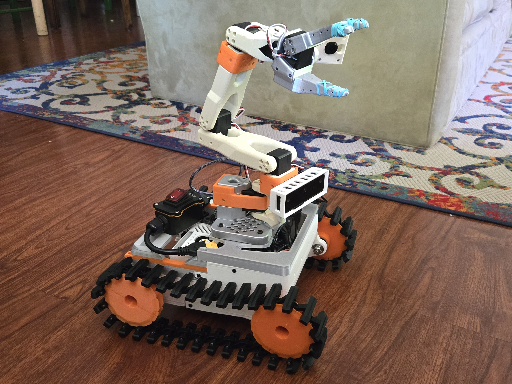
Printed an Armed Tank

It’s real! I love being able to print ideas into existence. Amazon helped too.

The “armed tank” thing has been making me giggle all day!

And it rolls! A little bumpy, as expected, and very slow so far. But it’s past its preliminary tests and we’re once again ready to make things complicated!

I’ve got ROS 2 all set up on the bots Raspberry Pi & I’m ready to go, apparently. It’s like relying on Google maps in a new city: I’m not exactly navigating, but I picked the destination! I have studied up on the locals, but I intend to interact with them as little as possible.

In fact, I just learned about ROSclaw. I still have to look closer, but it might be the case that the technical knowledge you needed this month is a fraction of what you needed last month.

That compression of knowledge turns mammals into magicians. From my mind, I have manifested and animated physical form. I’m now working on endowing it with autonomous ability… The ability to clean my floor.

We’ve got forward movement.
We’ve got angular twist.
And we’ve now got the correct buttons triggering forward motion and angular twist.

Next, we’re going to fire up ROS and try out SLAM mapping using the Oak-D depth camera. And I should definitely quadruple the top speed.

Although, I really need to capture some footage of the bot putting a shoe away or something, even if it’s teleoperated. You know, for the VC slide deck.

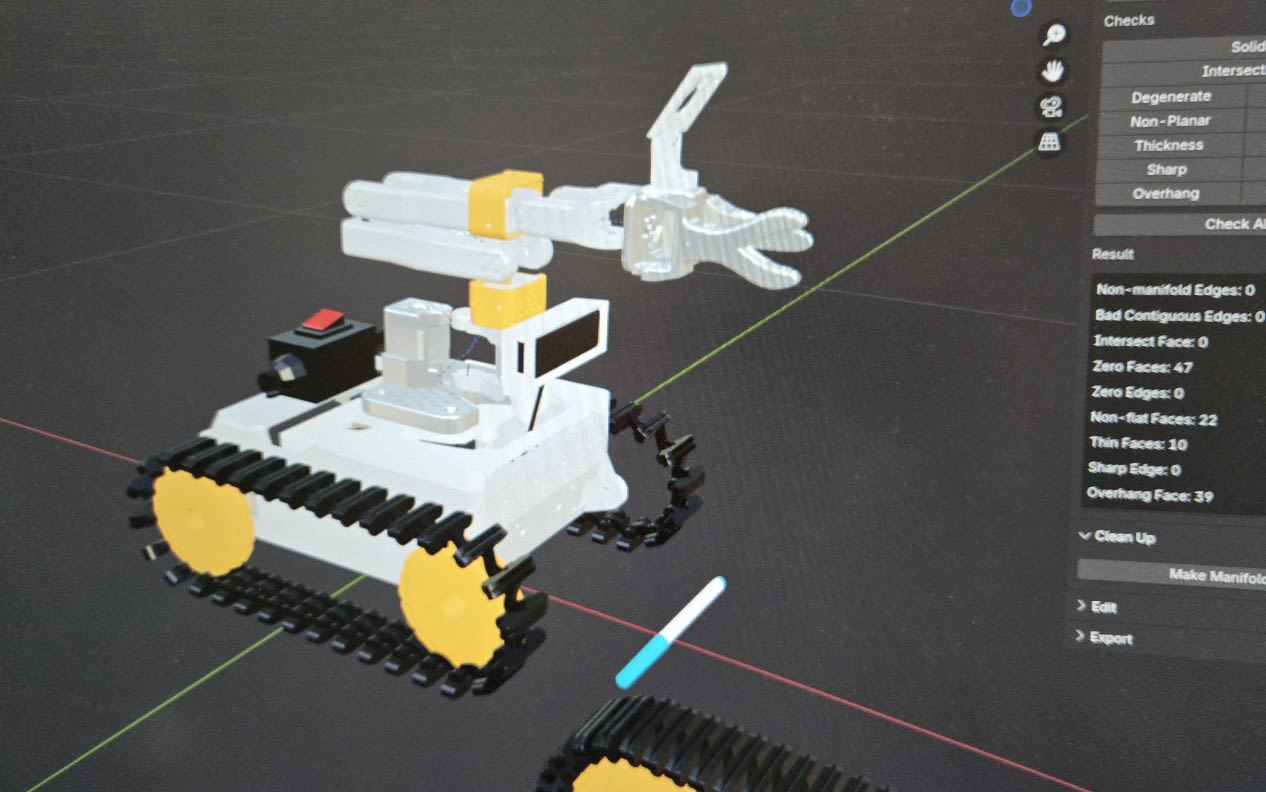
Designing A Tank

Designing A Tank

Designing tank tread

It’s typical that I pop on to Bambu Lab or Thingiverse for something to print, then quickly find myself in Blender designing the thing myself. Tank tread was no different. 

I like the way one guy connected the sections, but the print looked flimsy. Another design looks sturdy, but the sides aren’t beveled, so it’s going to get caught on stuff when it pivots. 

I watched a bunch of remote control tank projects, realizing… Designing a tank is tricky. That’s what the AIs had told me, advising I should stick with wheels. I’m definitely skipping tank tread suspension for version 1.

Took about 5 versions and 2 dozen tread prints before I nailed the design. 

The body of the tank is quite the endeavor. So many little considerations! Just figuring out how big it needs to be to fit everything inside is complicated. 

Cloned all of the parts in Blender and now I just rock it like a video game until I’m out of design concerns. 

This is how my wife accuses me of working so hard, while I feel like a kid playing a video game all day. This love for Blender is also why I decided to start an augmented reality marketing platform: it’s like getting paid to play video games.

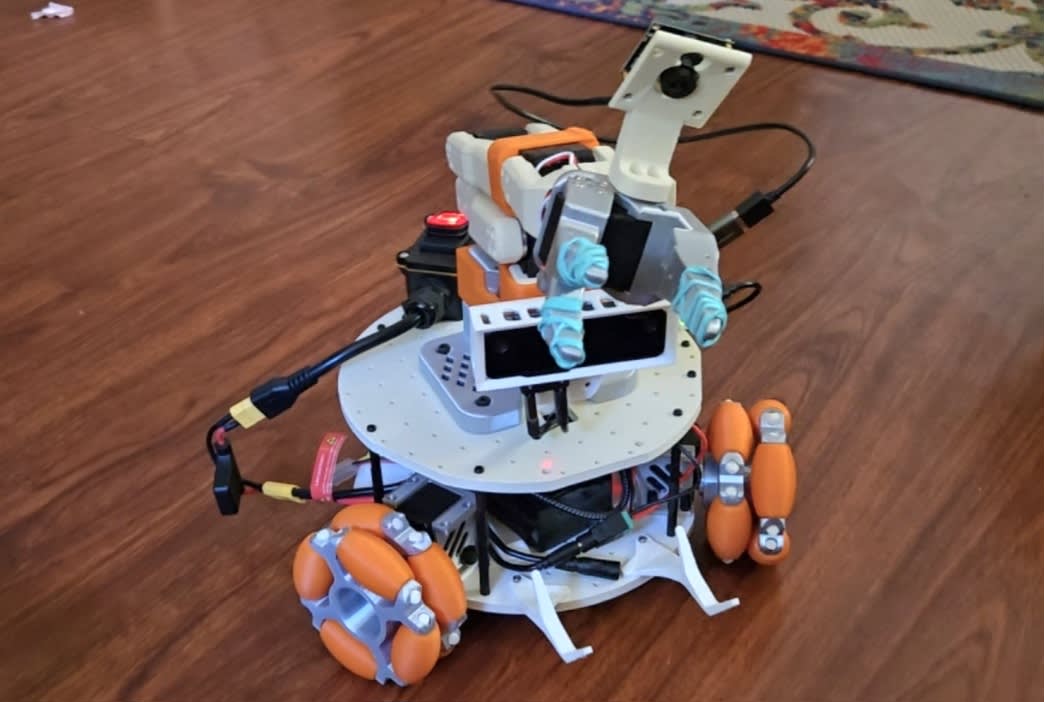
Omni-Flop

Omni-Flop

I finally <FINALLY> tried out the bot. I don’t know why, but I’ve been nervous, plus I’ve had plenty to procrastinate on. I mean, this project isn’t even in my top 3 projects I’m supposed to be working on, so…

Popped it on the floor, fired up the tele-op on the desktop, and immediately realized…

Omni-directional wheels suck. Wheels should be directional.

This guy on X is always posting about bot topics I also recently learned (and got excited) about, like he’s a semester behind at that same school. Right on cue, he posts about how cool omni-direction wheels are, lol! 

Someone comments, if they’re so great, why do I only ever see him on little tiny robots. I nearly answered something about more moving parts. But then I’m like, why comment instead of actually trying them out myself..?

So I finally put the robot on the ground, pressed forward (aka: the ‘W’ key), and watched it wiggle sideways and twist a bit, then wiggle the other way. 

IMMEDIATELY, I start debating with myself, normal wheels or tank tread…?

Mark the kiwi experiment, along with omni-directional wheels, a failure. I love-me a clever design, but only if it works.

The URDF Wall

The URDF Wall

The robot is together, the depth sensor is working, I’m teleoperating it from my desktop computer…

And what’s the next step?

The URDF file. 

Do you know what happens when you ask Cursor to make your URDF file for you the same way it made all the other files?

It gives you the dreaded:

“I’m sorry, Jeff. I’m afraid I cannot do that.”

I admit, I’ve been relying heavily on AI guidance through this whole process. I got coded a single thing and even got it to build me a UI so I don’t have to use the terminal. 

I’ve been taking in a lot of theory, but in terms of practical progress, I haven’t been looking further than the very next step.

And so far, that’s worked perfectly fine.

The next step has mostly been: ask Cursor what the next step is, then tell it to do it for me.

But the URDF file is different.

The URDF is the exact dimensions and pivot points of the robot. I’ve got it perfectly modeled in Blender, but there is no magical “export URDF” button that just tells ROS what the dimensions of this robot are.

And I couldn’t find another project with a complete file I could simply reuse.

I found some examples that were helpful, but at the end of the day I’ve got to go through this piece by piece and feed Cursor the exact data it needs to build the file properly. The Cursor can write the file for me, lol!

So after waiting on parts for over a month, during which time I could have been working on this URDF file, now everything is finally physically ready, but I’m learning about collision geometry and inertial tensor matrices.

Cursor swears that once I finish this file, it can do the rest.

We shall see.

Mercury Must Be Retrograde

Mercury Must Be Retrograde

I deduced Mercury must have gone retrograde from the progress of this robot project.

At the beginning of it, I started an article that said “the arm was only $140.”

Then I had to change that to under $300.

I am now at under $700, and thinking about scrapping that article entirely.

If anyone ever tells you robotics is easy, give them the stink-eye.

ROS is a beast.

I’ve asked all the top-shelf AIs the same question, and they all say basically the same thing: the VLA models are very capable, but don’t expect them to map and navigate your house.

Of course, better models are coming out all the time, so I’m not even totally sure what information the LLMs are basing that on. And these companies like physical intelligence are talking long arc autonomous actions.

But the AI approach to robotics feels so much more straightforward than ROS that I have been desperate to find a workaround.

But it seems like the choice is this: either I stop aiming for the task I’m currently aiming for – which is picking up toys off the floor and putting them away – and train it for something else, or I learn ROS.

The flip side of ROS is that it’s freaking incredible.

Give it the right sensors and it’ll map your room, navigate to waypoints while avoiding obstacles, and will eventually, finally trigger a VLA policy.

So remember back in January when I was all excited to try Pi0.5?

Well, instead of just doing that, I decided to do this big complicated thing first.

I’ve said out loud a dozen times now, “the last part to finish the robot is in the mail.”

But this time, I really think the last part to finish the robot is in the mail.

We’ll see.

I finally broke down and bought an OAK-D Lite depth camera after eventually accepting that $5 ultrasonic depth sensors were not going to do the trick.

But the Raspberry Pi is being fussy about the amount of power it thinks is available from the battery setup, so it’s refusing to deliver adequate power to the OAK-D. Which means I now need a special OAK-D adapter that splits data and power from separate sources.

Last part. Fingers crossed.

Making a LeKiwi Base

Making a LeKiwi Base

 I’ve decided I’m going all in and building a Le Kiwi base for the arm.

The question essentially has been, how much do I want to complicate this?

And this is definitely the complicated route.

Floor cleanup seemed like the most useful task. So on one side of the spectrum, I both the robot arm to a chunk of wood and set it on the ground to do what it can do with it reach. On the other side of the spectrum, I build an experimental mobile base with three wheels all pointed in  different directions, but it’s okay because they’re Omni wheels.

But if I gather training episodes on a stationary platform, that data won’t transfer especially well to a mobile platform later.

Unless the mobile platform is the base from the beginning.

So at first I was going to create a non-functioning Lekiwi base just to start collecting episodes from the visually correct platform.

But then I ordered the servos too.

And I was not about to pay $90 for omnidirectional wheels. Nor could I find a 3D-printed design I liked, so I designed my own omni wheels.

I love Blender.

The wheels match the arm..!

So now I’m learning about batteries and ROS, while becoming increasingly impressed by the Roomba.

 First ACT Policy Created

 First ACT Policy Created

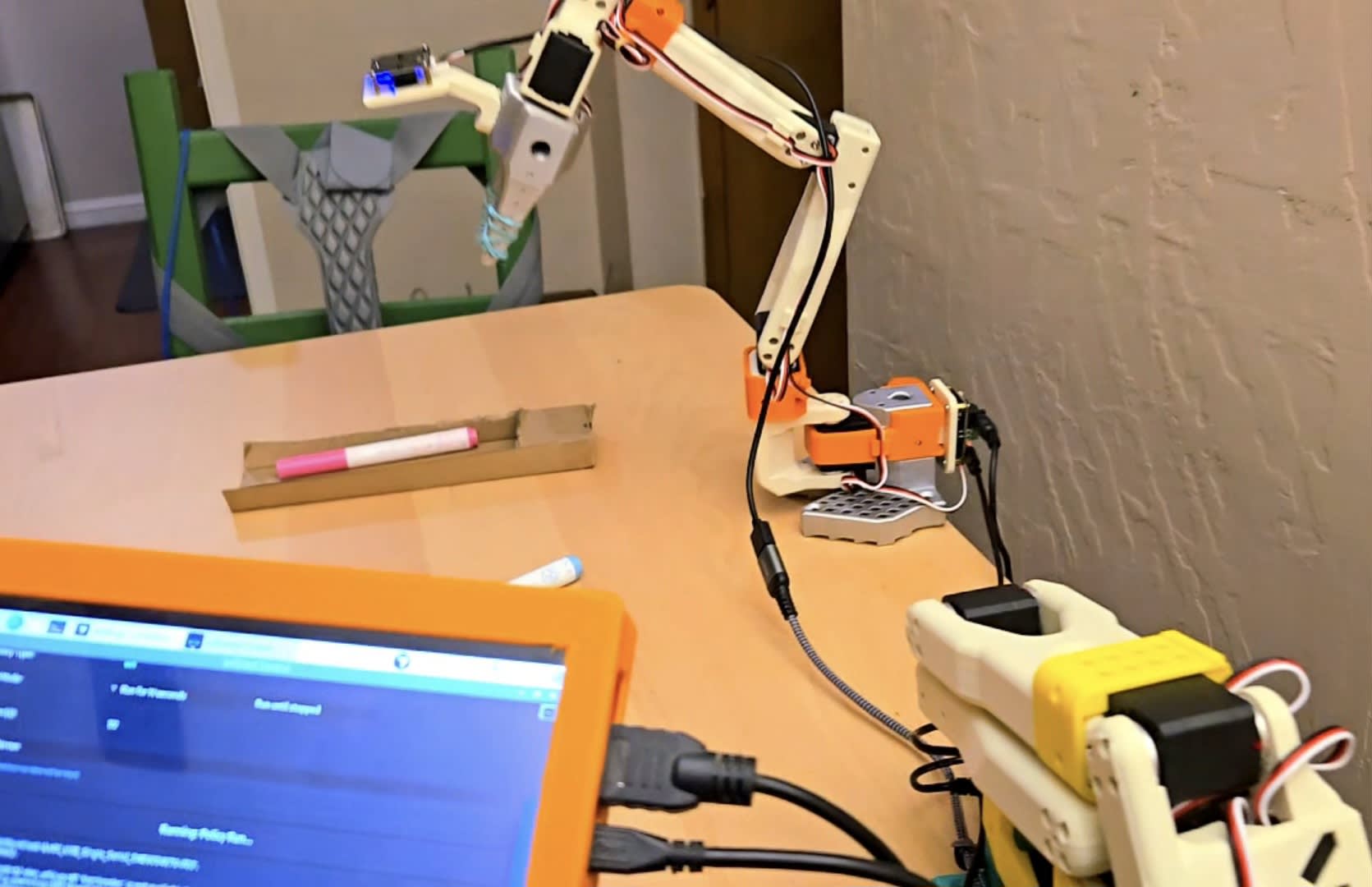
I made my first ACT policy! And it worked..!

I finally settled on a marker pickup task, primarily because Luciano loves throwing markers into the air and watching them fall. You can imagine how that game ends.

A marker-picker-upper would be a genuinely useful use-case. It would really need a mobile base to do it thoroughly, but baby steps..

I kept trying to come up with something more useful the arm could do while attached to a table, where stray markers don’t tend to collect. Some crafty little task that might actually be valuable. Like stringing beads, but that would need a special gripper. Could train it to put away tools, but I don’t want the first task to involve anything too bulky.

So I kind of gave up on making the first task overtly practical.

Instead, I trained it to pick up 2 markers – a blue & a pink – and place them into a container. I couldn’t even find a proper container and nearly 3D printed one, but ended up simply using a scrap of cardboard instead.

It’s just practice, to see if it works. And it did! Spectacularly..!

I’ve got my little interface now where I press a button and it starts teleoperation with recording running. It definitely took practice, and I also had to vibe-code a “don’t save that episode because I messed up” button, which turned out to be pretty important.

Then, after spending ten minutes trying to get Cursor on my Windows desktop to SSH into the Raspberry Pi and grab the data, I gave up, and humbly used a USB drive.

My desktop has 12 GB of VRAM, which turns out to be plenty to create and act policy. It took less than an hour.

After that, I copied the policy back onto the Pi, got Cursor to vibe-code a run policy button, laid out the markers, and fired it up.

It wasn’t perfect, but it succeeded pretty consistently: about as often as I did when I first tried teleoperating the pickup.

Teleoperation Achieved!

Teleoperation Achieved!

Got the leader arm together and working.

It’s still pretty awkward to use, but learning it is like a video game.

The next recommended step is to create an ACT policy, which is not a pretrained model that needs finetuning. It learns to mimic your teleoperations from scratch. So the plan is to capture around 30 episodes of teleop-ing the same task with the robot arm, while introducing a little variability, like shifting the lighting & changing exact positions.

Ridiculously, the part I’m stuck on now is deciding what task to train it to do.

In the meantime, I had Cursor whip me up a little user interface so I don’t have to keep entering commands manually. I’ve got the Raspberry Pi running the arm connected to a small touchscreen I used with my old CNC machine. Got that screen rigged up with a 3D-printed clamp alongside the leader and follower arms, which are also clamped to the table.

It’s starting to feel like the future..! Just need to figure out what to train it to do.

I bet this will be a major problem in the future; folks can’t figure out useful tasks for their bots to do. So they’ll rent them out to the folk who do know what to do with them, who we’ll call, Entrepreneurs.

Robot Arm Built

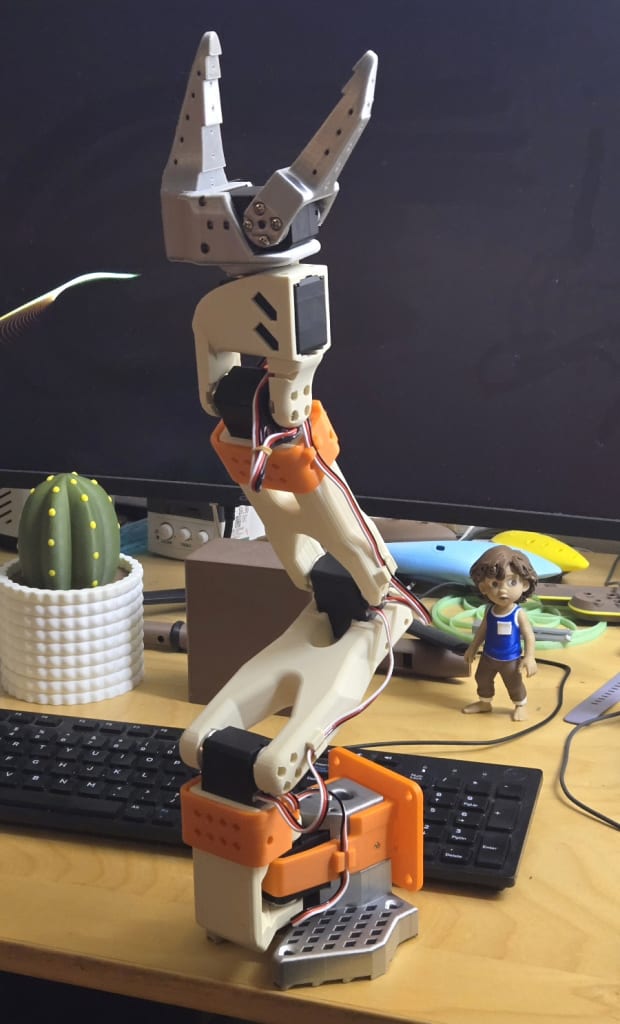
The servos arrived, and the build went super smoothly. I’m inappropriately proud of my color scheme.

My orange, silver, and cream colored SO-101 6-DOF robot arm.

They’ve got the best tutorial I’ve ever seen. IKEA could absolutely take notes.

The servos literally snapped into place and the included hardware was all that was needed to put the robot together. No mystery missing screws, no weird improvisations, no digging through coffee cans full of old bolts. Everything was there. That was the first.

 And the servos Daisy chain together. So the anticipated wire fiasco was minimal.

On the digital side, Cursor did everything.

I gave it the web address for the LeRobot project and the SO-101 arm, and it planned the setup, installed everything we needed, and handheld me through the motor ID and calibration process.

FYI, it is highly advised to ID the servos before setting up the robot.

With surprisingly little troubleshooting, I was logged into my robot through a website and controlling the robot hand.

Kind of.

I never actually got the phone control working well. I troubleshot it with Cursor for way too long, but the best I ever got was three of the servos awkwardly reacting to the phone.

It also became pretty clear that doing anything requiring finesse using a cell phone, and especially controlling the gripper with a little slider on a touchscreen, was going to be impractical.

It was very cool to get the thing wiggling, but if I want anything resembling decent teleoperation, I’m going to need the leader arm.

That pushes back quality teleoperation until after Santi leaves, which is a little disappointing. But I think I properly compensated for abandoning my mechanical engineering degree pursuit.

Critically, the servos for the leader arm are not just 6 of the same servo. They have different gear ratios involved and apparently that’s important. You can buy full leader/follower kits with all the servos included, but you can’t just buy the leader-arm servo set as a simple bundle.

So now I’m ordering from the servo company in China, and naturally they don’t even have all the needed servos in the same warehouse. 

Moral of the story: just buy the full kit.

I’m finally building a robot arm!!

I’m finally building a robot arm!!

I’ve been watching the open-source project LeRobot for nearly a year now, and I’ve been seriously impressed by the VLA models coming out of it, particularly the Pi0.5.

Learn all about that project at huggingface.co/lerobot

The only reason I hadn’t jumped into a robotics project was to avoid yet another project that distracts me from the projects I should probably be working on.

But it’s Christmas break and Gabi’s older son Santi is coming to visit. He’s been studying mechanical engineering and working at a marine robotics company. Honestly, I don’t think I need a better excuse than that to finally jump into building an SO-101 robot arm.

And they’re cheap.

I’ve already got a Raspberry Pi 5, so all I really needed to buy were the servos, the servo bus, and a power cord, which was about $140 on amazon. I just started 3D printing the main arm.

There’s a “leader” teleoperator arm option that lets you control the follower arm. But since it’s a whole 2nd setup of servos (another $140) and they also say you can teleoperate it with your cell phone, I’m going to try the cell phone version first, as I already have one of those. 

So excited to have a robot to do my bidding!